How to filter ads from websites by creating a blacklist. Notes on how block by url/link, click on image to see full view to read notes. A major benefit with using host file vs plugins/addons etc is that it's global for the system. Where as a plugin for a browser is only valid for that browser specifically. Rather than update all browsers, host file applies to the entire PC and all software that access the internet .
Steps in, this example of chrome cache. However all cache displays show web addresses, this will be used for the host file.

Also, a hostfile manager program allows to update the host file using GUI, but also allows to enable and disable entries (good for testing)
Additionally, tcpview by sysinternals, displays the tcp addresses along with which app it's requesting from, which is good to see which ip addresses are using your PC.
For MAC, the host file editing , shown here http://decoding.wordpress.com/2009/04/06/how-to-edit-the-hosts-file-in-mac-os-x-leopard/
Use whois xyz.com at google search, to determine if the site is actually a pest. Note that many sites use other sites to store their data to decrease their traffic so that their servers are not brought down by overload.
an example from browser where the ad is blocked

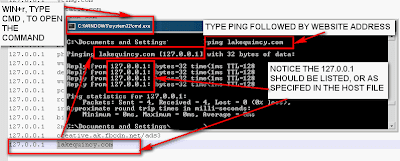
Another way to test is to using ping command (from Run->cmd), then type ping xyz.com where xyz.com is the address to be blocked, if 127..... appears, then it's blocked.
The issue with blocking site is when the site has multiple domains(ip addresses). To block a 'range' of ip address for example 64.233.169.x , where x is 0-255, use the route command:
route add -p 64.233.169.0 mask 255.255.255.0 127.0.0.1
To set it permanent, add this command to a dos bat file (bat), and copy to start menu-> startup

 screenshot